From Scattered Tools to One Platform: How This Engineer Rebuilt His Workflow with Genspark

When Damien Lienert started his AI journey in late 2020, the landscape looked very different. Text-to-image generation was a niche pursuit, large language models weren't mainstream, and the idea of a single platform supporting Kling, CogVideoX, Flux, and AI Slides in one interface didn't exist yet.
Damien didn't wait for the tools to catch up. A Swiss IT systems engineer and platform developer, he went deep into machine learning fundamentals, Midjourney, Stable Diffusion, custom model checkpoints, and LoRA training. While most early adopters were experimenting with prompts, he was engineering pipelines.
Today, he's a Genspark Genius Ambassador. And the path from scattered power user to platform advocate is a case study in what happens when a technical builder finally finds infrastructure that keeps pace with their ambition.
Why Genspark Became His Go To Platform
For years, operating at the frontier of AI meant managing multiple subscriptions. Pro accounts at Claude. Pro accounts at ChatGPT. Separate API keys for image generation models. Different billing cycles, different interfaces, different rate limits, and constant context-switching between them all.
'I had Pro accounts at Claude and ChatGPT,' Damien says. 'Now I only use Genspark.'
The switch wasn't driven by any single feature. It was the architecture. Genspark's multi-model environment, supporting Kling, CogVideoX, Flux, and more under one roof, eliminated the overhead that serious AI users typically accept as a fixed cost. 'All the models I care about in one place. No separate API keys everywhere.' For someone who'd spent years managing that infrastructure manually, it means a lot.
How Damien Uses Genspark Across Image Generation, Code, and AI Workflows
Damien's use of Genspark spreads through various corners of the platform. Here's what he's building:
- Image generation: branding assets, logos, and visual content for his site AITechArt, using Genspark's multi-model image generation with advanced camera settings
- Genspark Code: coding environment inside Genspark for building and testing features directly on the platform
- n8n workflow integration: Genspark's API connected as a model provider inside n8n, enabling automated AI workflows without additional API management
- AI Slides: presentation creation directly in the platform, with a full guide on AI Slides 5.0 with Skills in progress
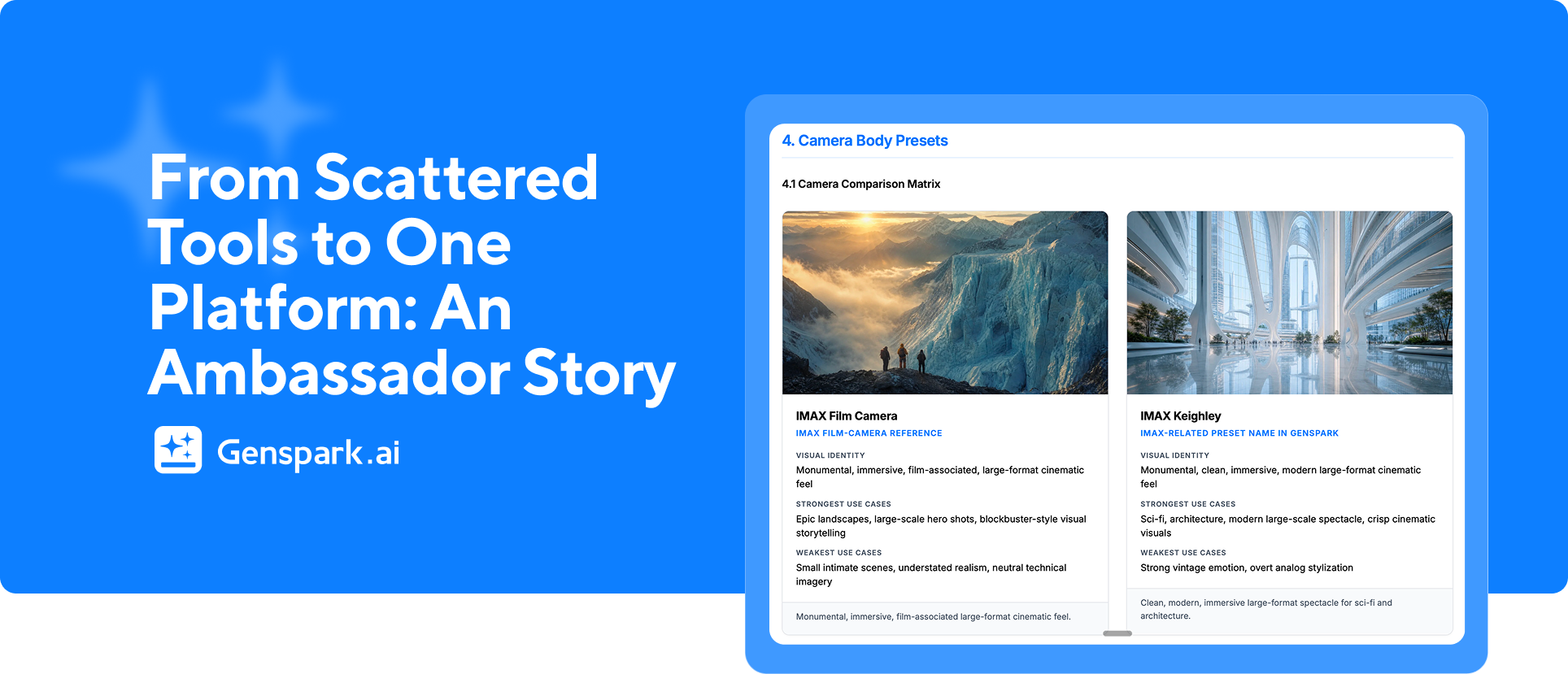
- Technical documentation: detailed camera settings reference for Genspark's image generation system, built from hands-on experimentation
The n8n integration is a particularly clean example of what makes Genspark useful for technical users. 'I use Genspark's API key as a model provider inside n8n,' Damien explains. 'It just works.' For workflow engineers who've wrestled with multi-provider API setups, that simplicity is the feature.
The Camera Settings Guide: What Happens When a Power User Goes Deeper Than the Docs
One of Damien's most revealing contributions to the Genspark community wasn't a tutorial or a review. It was documentation.
He built a detailed technical reference for Genspark's image generation camera settings. He was already using the system at a level of depth that required a personal reference. 'I started documenting the camera settings because I was already using them at a level where I needed a reference,' he says.
That kind of organic contribution, where a user goes so deep they start creating resources for others, is exactly what the Genius Ambassador program was built to support and amplify. Damien is now formalizing that guide with full visual examples, and building a new comprehensive walkthrough of AI Slides 5.0 with Skills for the Genspark community.
Interested in becoming a user and sharing your own contributions with the community? Learn more about the Genius program and apply here.
Genspark Genius Ambassador: Content for Users Who Push the Platform to Its Limits
Damien's focus as a Genius Ambassador is deliberate. He's not creating beginner onboarding content. He's creating technical tutorials, workflow breakdowns, and feature explainers for the users who want to understand Genspark from the inside out — the generative AI artists, workflow engineers, and technical creators who treat AI tools as infrastructure, not appliances.
'I want to create tutorials for users who want to push the platform to its limits,' he says. 'Not just use it, but really understand what it can do.'
If that sounds like you, you would probably enjoy becoming part of our Damien’s Genius Chapter: Genspark for Creative Work.
He'll distribute primarily through Reddit and Discord, where technical AI communities have the depth of conversation that matches his content. Upcoming guides include the completed camera settings walkthrough with images and the AI Slides 5.0 with Skills explainer.
FAQ: Genspark for Technical and Power Users
Can you use Genspark as a model provider in n8n workflows?
Yes. Genspark provides an API key that can be configured as a model provider inside n8n, allowing you to use Genspark's models within automated workflow pipelines without managing separate API credentials for each model.
How does Genspark compare to having separate Claude and ChatGPT Pro accounts?
For users who primarily need access to multiple AI models, Genspark consolidates that access into a single platform with unified billing. Power users like Damien Lienert have found they can replace both Pro subscriptions with Genspark while gaining access to additional models like Kling, Flux, and CogVideoX.
What is Genspark's image generation camera settings system?
Genspark's image generation interface includes camera-style parameters that control perspective, framing, and compositional elements of generated images. These settings give advanced users fine-grained control over output style — detailed enough that power users like Damien have built dedicated technical reference guides for them.
What is Genspark AI Slides 5.0 with Skills?
AI Slides 5.0 with Skills is Genspark's latest presentation generation environment, incorporating the platform's Skills system for enhanced automation and customization. Damien Lienert is currently building a comprehensive technical guide for this feature targeting advanced users.
🚀 Ready to go deeper with Genspark?
Step 1: Try multi-model image generation with Kling, Flux, or CogVideoX — no separate API keys needed.
Step 2: Compare the difference in image generation when selecting different camera settings.
Step 3: Share your experience with the community within the Genspark for Creative Work chapter!